Free Image Flipper
Upload Your Image
Drag & Drop your image here or click to browse
Supported: JPG, PNG, WebP, GIF • Maximum 20MBImage Preview
Flip Your Image
Download Image
Flip Image Online - Free Image Flipper Tool
What is Image Flipper?
An Image Flipper is a simple online tool that allows you to flip an image in different directions. You can flip your photo horizontally to create a mirror effect or flip it vertically to turn the image upside down.
Sometimes an image looks better when its direction is changed. For example, you may want a person or object in a photo to face the opposite direction. Instead of editing the image manually, an Image Flipper can do this in just a few clicks.
Simply upload your image, choose the flip direction, preview the result, and download the flipped image. There is no need to install software or have advanced photo editing skills.
How to Use Image Flipper?
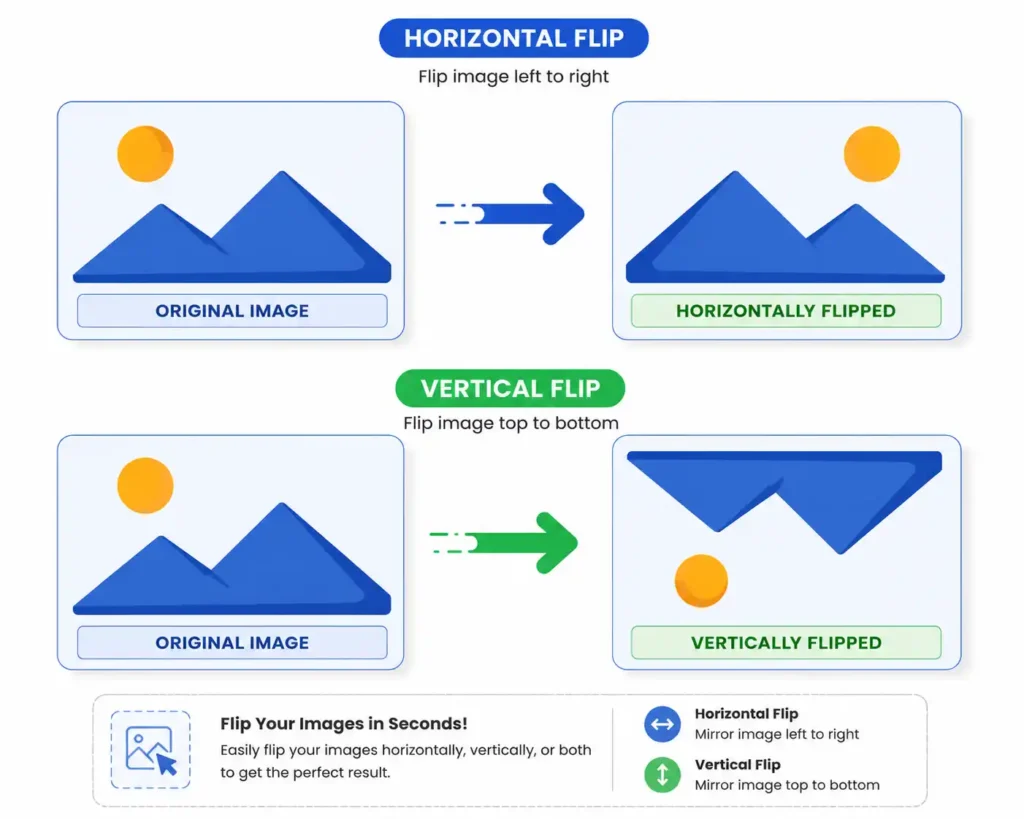
Using our Image Flipper is quick and simple. You can flip your image in just a few steps:
- Upload Your Image
Click the upload button and choose an image from your device. You can also drag and drop your image into the upload area. - Choose a Flip Direction
Select Flip Horizontal to create a mirror effect or Flip Vertical to turn the image upside down. - Preview Your Image
The tool will show you the flipped version of your image so you can check the result before downloading. - Reset if Needed
If you do not like the result, simply click the reset button and start again. - Download Your Image
Choose your preferred image format and quality, then download your flipped image to your device.
Features of Our Image Flipper
Our Image Flipper is designed to make flipping images easy for everyone. You do not need photo editing experience to use the tool.
Flip Images Horizontally
Flip your image from left to right to create a mirror-style version. This is useful when you want to change the direction of a person, object, or design in a photo.
Flip Images Vertically
You can also flip an image from top to bottom. This option is useful when you need to reverse the vertical direction of an image.
Easy Image Preview
You can see your flipped image before downloading it. This helps you check the result and decide whether you want to keep the changes.
Reset Your Image
Made a change you do not like? Use the reset option to return the image to its original position.
Choose Your Download Format
After flipping your image, you can download it in a supported format such as JPG, PNG, or WebP.
Simple and Beginner-Friendly
The tool is easy to use, even if you have never edited an image before. Upload your image, click a flip button, and download the result.
No Software Installation
You can flip images directly from your browser. There is no need to download or install complicated photo editing software.
Free to Use
Our Image Flipper can be used online for free. You can quickly flip your images without creating an account or paying for software.
Free Online Image Flipper
Our free online Image Flipper makes it easy to change the direction of your photos whenever you need to. Whether you want to create a mirror image, flip a photo upside down, or simply experiment with a different image direction, the tool helps you do it quickly.
You can use the Image Flipper directly in your browser. Upload your image, choose horizontal or vertical flip, preview the result, and download the final image.
The simple interface makes the tool suitable for students, content creators, bloggers, designers, social media users, and anyone who needs a quick way to flip an image online.
Supported Formats
Our Image Flipper supports popular image formats, making it easy to work with different types of images.
JPG / JPEG
JPG is one of the most commonly used image formats. It is widely used for photographs and images because it offers a good balance between image quality and file size.
PNG
PNG is useful for images that require transparent backgrounds or clear details. You can upload PNG images and flip them easily.
WebP
WebP is a modern image format that can provide good image quality with a smaller file size. It is commonly used for websites and online content.
GIF
You can also upload GIF images to the Image Flipper. However, depending on how the image is processed, animated GIFs may not keep their animation after conversion.
Image Flipper (FAQ)
What is an Image Flipper?
An Image Flipper is an online tool that changes the direction of an image. You can flip an image horizontally or vertically.
What is the difference between horizontal and vertical flip?
A horizontal flip reverses the image from left to right and creates a mirror-like effect. A vertical flip reverses the image from top to bottom.
Can I flip an image online for free?
Yes. You can use our online Image Flipper for free to flip your images directly from your browser.
Do I need to install any software?
No. You do not need to install any software. The Image Flipper works directly in your web browser.
Can I preview the flipped image before downloading?
Yes. You can preview your image after flipping it and check the result before downloading.
Which image formats are supported?
The tool supports popular image formats, including JPG, JPEG, PNG, WebP, and GIF.
Can I flip an image multiple times?
Yes. You can flip your image horizontally, vertically, or use both options. You can also reset the image whenever you want.
Is Image Flipper easy to use?
Yes. The tool is designed for beginners. You only need to upload your image, choose a flip direction, and download the result.